


You built the website. Published the content. Even submitted the sitemap.
And Google? Still ignoring you.
If you’ve been typing “why is my website not ranking on Google” into search boxes late at night — honestly, you’re not alone. This is one of the most frustrating things I hear from business owners every week. You did everything people told you to do, and the traffic just won’t come.
Here’s something that might help. In its large 2023 content study, Ahrefs analyzed around 14 billion web pages and found that 96.55% of all pages on the internet get zero organic traffic. Not a little traffic. Zero.
“A client came to me last year with a three-year-old website that had never seen a single visitor from Google. Three years. Not because his business was bad — it was actually very good. The problem was entirely technical and strategic. Within four months of fixing the right things, he was on page one for his main keyword. The website had not changed. The strategy had.”
So what’s actually going wrong?
In most cases, it comes down to one of 12 specific problems. I’ve seen all of them — working with clients in home improvement, real estate, cybersecurity, construction, jewelry, and more. The good news is that every single one of these problems can be fixed. You just need to figure out which one is hurting you.
Let’s go through all of them.
Before Anything Else — Ranking and Indexing Are Not the Same Thing
A lot of people mix these two up. Worth clearing up before we go further.
Indexing is when Google finds your page and stores it in its system. Think of it like a library adding your book to their catalog — it’s in the system, but nobody’s recommending it yet.
Ranking is when Google actually shows your page in search results for a keyword. That’s the harder part.
Your site can be fully indexed and still rank nowhere. And if it’s not indexed at all — ranking is impossible.
Quick check: Go to Google and type site:yourwebsite.com
Pages showing up? You’re indexed. Nothing showing? Google hasn’t added you yet.
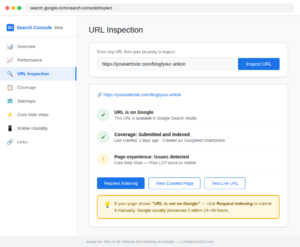
You can also open Google Search Console → URL Inspection Tool and check any individual page directly.
Always do this check first. I’ve seen businesses spend months “fixing their SEO” without realizing Google couldn’t even see their site.
12 Reasons Why Your Website Is Not Ranking on Google
Reason 1 — Your Site Is Not Indexed
If your pages are not indexed, Google cannot rank them — no matter how good your content is. Use Google Search Console’s URL Inspection tool to check and request indexing for every important page.
Simple but brutal. If Google can’t find your pages, they won’t rank. Full stop.
Three things secretly block indexing on many sites:
- Your robots.txt file is telling Google to stay away
- A NoIndex tag is switched on — sometimes by accident
- In WordPress, the “Discourage search engines” checkbox under Settings → Reading is ticked. This one is shockingly common on new sites
Fix it:
Open Google Search Console → URL Inspection → paste your URL → click “Request Indexing.” Submit your XML sitemap if you have not already.
Also double-check that WordPress setting. One checkbox can invisibly block your entire site from Google — and you’d never know unless you looked.
Reason 2 — You’re Targeting the Wrong Keywords
Most business owners target keywords they use internally — not the words their customers actually search. Use Google Keyword Planner to find real search terms and focus on long-tail keywords with lower competition.
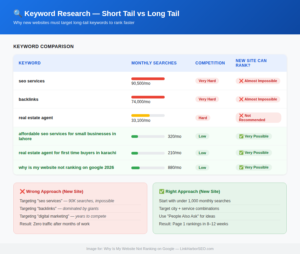
A home improvement contractor came to us frustrated. He’d been targeting “home renovation services” for eight months — zero movement. When we pulled his Search Console data, the problem was clear. That keyword is dominated by massive directories like HomeAdvisor and Houzz. A brand new site has no business competing for it on day one.
We shifted his focus to “kitchen remodeling contractor in [his city]” and “bathroom renovation cost estimate.” Within 11 weeks, he was on page one for both. Same service. Different keywords. Completely different result.
This is how new websites win early traffic — long-tail keywords. Longer, more specific phrases with lower competition and higher intent from the person searching.
Instead of “SEO services” → try “affordable SEO services for small businesses”
Instead of “real estate agent” → try “real estate agent for first time buyers in [city]”
Fix it:
Use Google’s own autocomplete, the “People Also Ask” section, or free tools like Ubersuggest and Google Search Console to find keywords with under 1,000 monthly searches. That’s your sweet spot when you’re starting out. One well-chosen keyword that matches real search intent will do more for your rankings than ten vague keywords that nobody actually types into Google.
If you’re not sure how keyword targeting fits into the bigger picture, our guide on What is SEO? The Honest Guide Small Business Owners Actually Need breaks it down from the beginning.
Reason 3 — Your Content Is Too Thin
Google compares your page to every competing page. If your article answers three questions and the top result answers fifteen, Google knows which one to show. For most topics, 1,500 to 2,500 words is a realistic minimum.
A jewelry brand we worked with had 24 blog posts published. Most were between 200 and 400 words. They’d been publishing for over a year with almost no traffic to show for it.
We took their best post — “how to choose an engagement ring” — and rewrote it properly. Added sizing guides, metal comparisons, budget breakdowns, real product photos with alt text, and a FAQ section at the end. Took it from 380 words to just under 2,000.
That one article now brings in consistent traffic every month. The other 23 posts? Still sitting there doing nothing.
Word count isn’t the actual goal. Depth is. But depth usually means length.
Fix it:
Search your keyword. Open the top three results. What questions are they answering? What sections do they cover? What examples do they use? Write something that covers all of that — but better. More specific. More useful. That’s how you compete.
Reason 4 — Your Content Doesn’t Match What People Actually Want
Search intent is the real reason behind every Google search. If your content does not match what the user actually wants — whether that is information, comparison, or a purchase — Google will not rank it regardless of how well it is optimized.
This one trips up even experienced writers.
Google doesn’t just rank good content. It ranks content that matches what the searcher actually wants to find. There are four types of search intent:
- Informational — they want to learn (“what is on-page SEO”)
- Navigational — they’re looking for a specific site (“LinkHarbor SEO blog”)
- Commercial — they’re comparing options (“best SEO tools 2026”)
- Transactional — they’re ready to act (“hire SEO expert”)
If someone searches “how to do keyword research,” they want a step-by-step guide — not a sales page for your keyword research service. If your page tries to sell them something when they came looking for information, Google knows it. Bounce rates go up, time on page goes down, and rankings follow.
Fix it:
Search your keyword and study the top 3 results. Are they how-to guides? Listicles? Comparison articles? Product pages? That pattern tells you exactly what Google wants for that keyword. Match the format, match the intent, and answer the question fully — do not leave the reader with unanswered questions.
Reason 5 — You Have No Backlinks
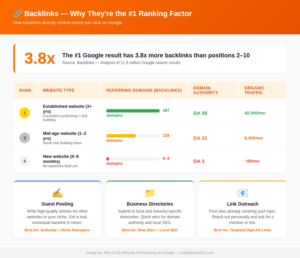
Backlinks are votes of confidence from other websites. Without them, Google has no external signal that your site is trustworthy. Even 5 to 10 quality backlinks from relevant websites can significantly improve your rankings.
A cybersecurity firm reached out after six months of consistent publishing — detailed technical guides, comparison posts, original research. Good content, genuinely. But their rankings were stuck between position 45 and 60 across the board.
We ran a backlink audit. Zero referring domains. Not one external site was linking to them.
Their content was competing against firms that had been earning links for years. It didn’t matter how well-written the articles were — Google had no external signal to trust the site yet.
We built 12 quality backlinks over three months through guest posting and niche directory placements. By month four, six of their target pages had moved to page one or two. The content was always good enough. The links were the missing piece.
Backlinko’s large-scale analysis of Google search results found the #1 result in Google has 3.8x more backlinks than the pages ranking below it. That gap is real. And if you’re wondering whether links still matter this much in 2026, we tested that exact claim in our guide: do backlinks actually build authority.
Fix it:
Three methods that work for new sites:
- Guest posting — write articles for other websites in your niche and earn a link back
- Business directories — submit to relevant local and industry directories
- Link outreach — find sites already covering your topics and reach out for a mention
The key word is quality — one link from a trusted, relevant website is worth more than a hundred links from random, unrelated websites. This is where professional link building and guest posting becomes essential.
If you’re starting from zero, our guest posting framework walks through earning your first backlink step by step, and our guide to authority backlinks that actually move rankings covers how to qualify the sites worth pitching.
Reason 6 — Your Website Loads Too Slowly
Slow pages lose visitors before they read a single word — 53% of mobile users leave a page that takes more than 3 seconds. Compress images to WebP, add a caching plugin, and check your hosting.
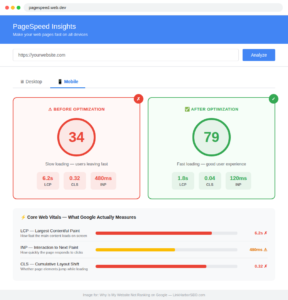
A construction contractor client had a beautiful website. Custom design, professional photos, the whole package. His PageSpeed score on mobile was 34.
Every large site image was loading at full resolution — some files over 3MB each. No caching plugin. Shared hosting that couldn’t keep up.
We compressed the images to WebP format, enabled caching, and moved him to better hosting. PageSpeed score went from 34 to 79 in one week. His average session duration improved — people were actually staying to read instead of bouncing before the page finished loading.
Google tracks this through Core Web Vitals — three specific metrics:
- LCP — how fast the main content appears on screen (target: under 2.5 seconds)
- INP — how quickly the page responds when someone clicks something
- CLS — whether elements jump around while the page loads
Fix it:
- Convert images to WebP and compress before uploading
- Add a caching plugin — WP Rocket or LiteSpeed Cache both work well
- Check your hosting — cheap shared hosting is often the bottleneck
- Run your site through PageSpeed Insights to see your actual numbers
While you’re at it, check for the quieter technical killers too: broken links leading to 404 pages, and a missing SSL certificate that shows your site as “not secure.” Google Search Console flags most of these issues for free.
Reason 7 — Your Site Breaks on Mobile
Google crawls the mobile version of your site first — mobile-first indexing has been the standard for years. If your mobile layout is broken, that is what Google is judging you on.
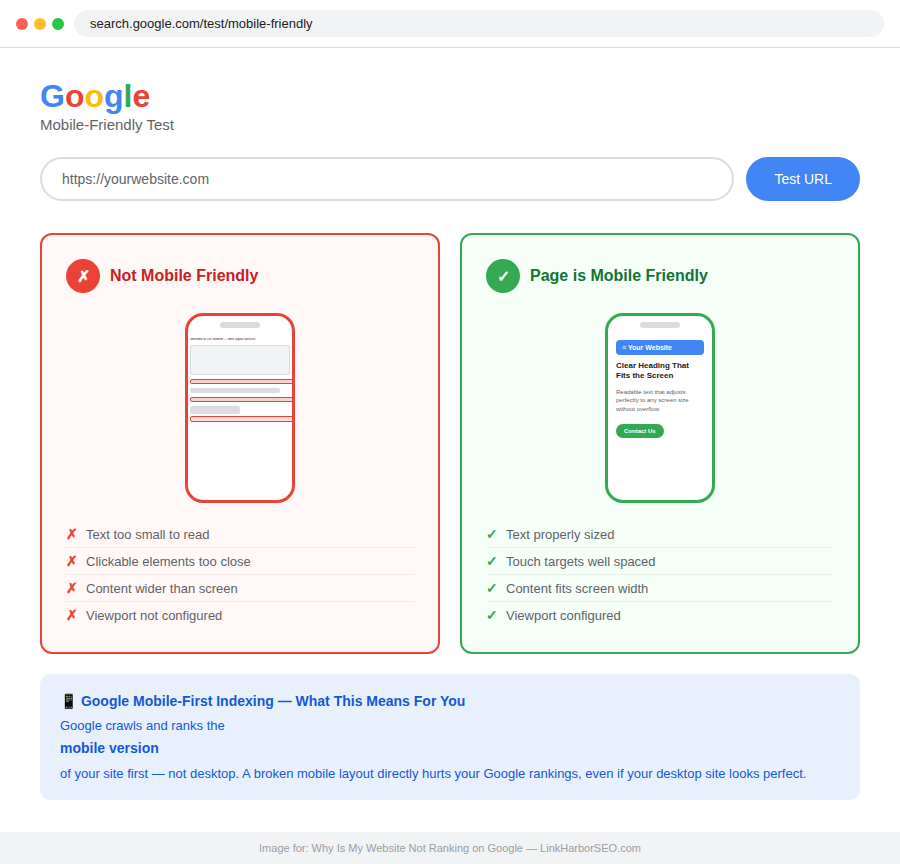
Google doesn’t crawl the desktop version of your site first. It crawls mobile. Over 60% of searches happen on mobile devices.
If your mobile layout is broken, buttons are too small to tap, or text runs off the screen — that’s what Google is judging you on. Not the polished desktop version you designed.
Fix it:
Run your site through Google’s free Mobile-Friendly Test. Takes 30 seconds and shows exactly what’s broken. If your theme isn’t fully responsive, switch it. There’s no workaround for this one — it has to be fixed properly.
Reason 8 — On-Page SEO Is Incomplete
Weak on-page SEO means Google cannot understand what your page is about. Every page needs a focus keyword in the title, a proper meta description, structured headings, and internal links.
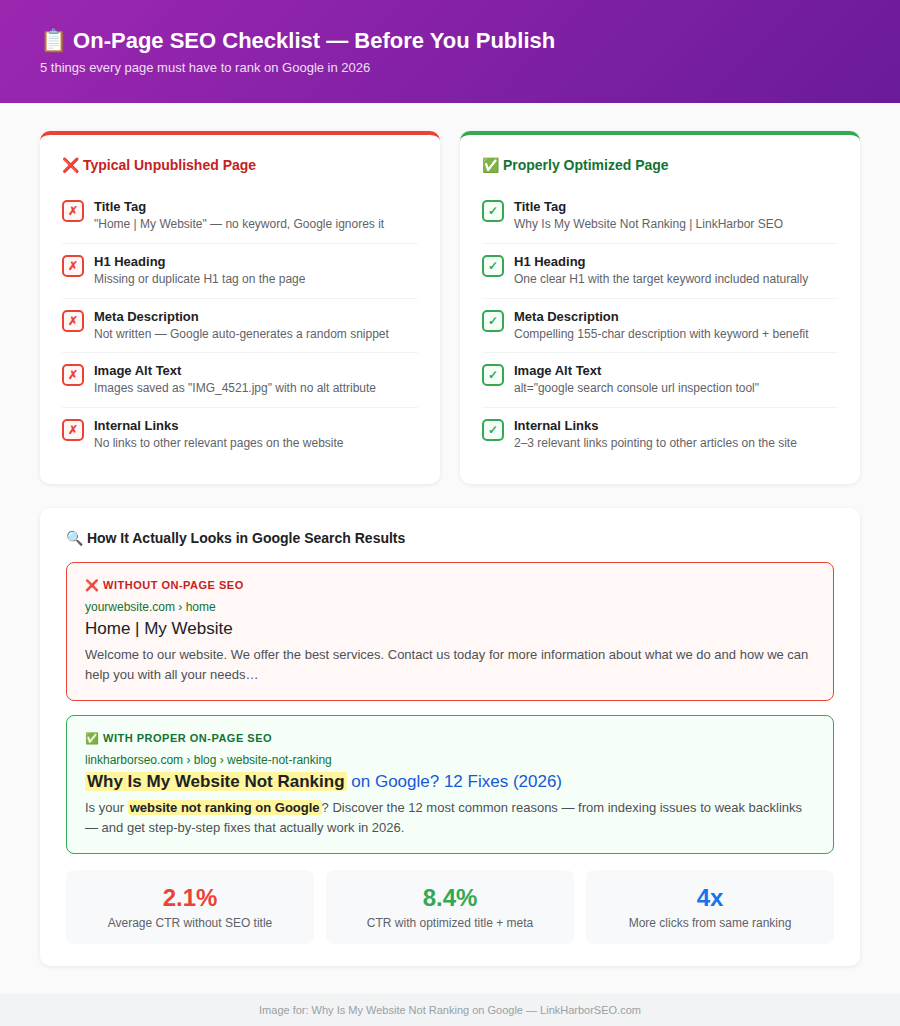
On-page SEO is the foundation. Without it, even well-written content struggles to rank.
Most common issues I see:
- Title tag is generic or doesn’t include the target keyword
- No meta description — hurts your click-through rate in search results
- H1 heading doesn’t contain the keyword
- Images uploaded without alt text — Google reads alt text, not the image itself
- Keyword appears once and never again naturally throughout the article
Fix it:
Before publishing anything, run through this checklist:
- Title tag includes the main keyword
- H1 tag includes the main keyword
- Keyword appears naturally in the first 100 words
- At least 2 internal links to related pages on your site
- Every image has a short, descriptive alt text
Five things. Ten minutes. Makes a measurable difference. If you are using WordPress, a plugin like Rank Math SEO gives you a clear checklist for every page so you know exactly what to fix.
Reason 9 — Your Pages Are Isolated
An orphan page is a page no other page on your site links to. Google’s crawlers follow links — if nothing points to a page, it may never be found, and it receives no authority from the rest of your site.
I’ve audited real estate sites where half the property listing pages had zero internal links pointing to them. They were completely invisible to Google — not because the content was bad, but because nothing connected them to the rest of the site.
Fix it:
Every new article you publish should link to 2 or 3 other pages on your site. And whenever you publish something new, go back to relevant older articles and add a link to it.
Five minutes of work. Real impact. For local service businesses especially, connecting your service pages through internal links is one of the fastest wins available — see our Local SEO Guide for how we structure this.
Reason 10 — Your Website Is Too New
New websites typically take 3 to 6 months before Google starts ranking them — the Google Sandbox period. The fix is simple: publish consistent content and build your first backlinks while you wait.
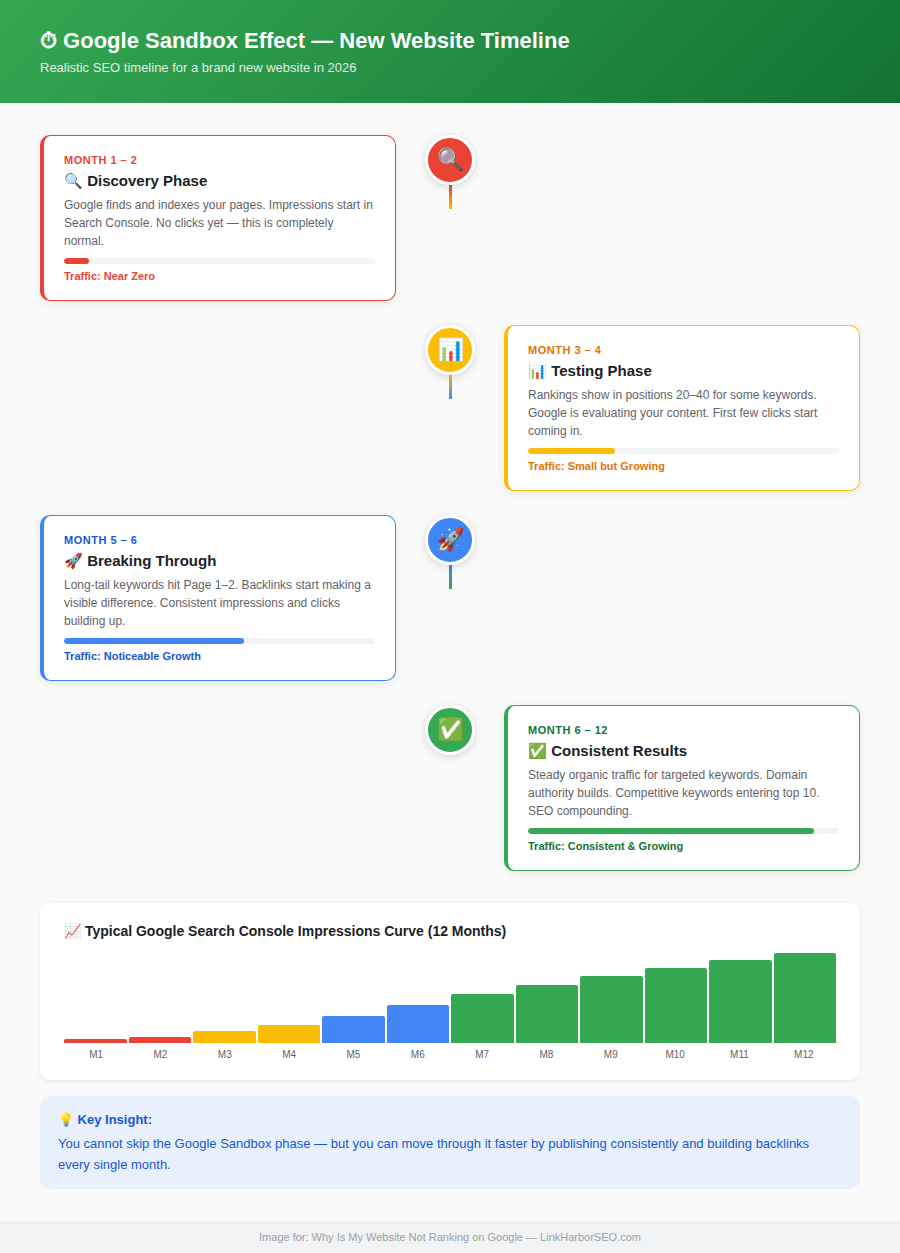
A real estate client came to us after two months of publishing and seeing nothing. No clicks. Almost no impressions. He was convinced something was technically broken with his site.
It wasn’t broken. It was just new. If you’re two months in and still typing “why is my website not ranking on Google” into search — this is usually the answer.
This trust-building phase is called the Google Sandbox effect. When a new domain appears, Google doesn’t immediately give it rankings. It watches — are they publishing regularly? Are other sites linking to them? Is anyone actually visiting? Only after seeing consistent signals does it start ranking the site properly.
We see this pattern across every niche we’ve worked in — home improvement, construction, jewelry, cybersecurity, real estate. The timeline is consistent:
| Timeframe | What to Expect |
|---|---|
| Month 1-2 | Pages start getting indexed, impressions appear in GSC |
| Month 3-4 | Rankings appear in position 20-40 for some terms |
| Month 5-6 | Reaching page 1-2 for long-tail keywords |
| Month 6-12 | Consistent, growing organic traffic |
We told that real estate client: keep publishing, keep building links, don’t disappear. By month five, his site was pulling consistent traffic for local property search terms. He just had to survive the waiting period first.
Fix it:
You can’t skip this stage — but you can move through it faster. Publish quality content consistently (at least two posts per month), build links steadily, make sure your sitemap is submitted to Google Search Console, and request indexing for every new page. Google rewards consistency above almost everything else.
Reason 11 — Duplicate Content
When the same content appears on two different URLs, Google gets confused about which one to rank — and usually picks neither. Merge competing pages into one, or use a canonical tag.
When Google sees the same content appearing on two different URLs, it gets confused about which one to rank. Most of the time it picks neither — or picks the wrong one.
This is called keyword cannibalization — two of your own pages competing against each other for the same keyword and splitting whatever authority you’ve built.
Fix it:
If two pages cover the same topic, merge them into one strong, comprehensive page. Or add a canonical tag to the weaker version telling Google which one is the primary page.
Also check that your site doesn’t accidentally serve the same content on both http:// and https:// versions, or www and non-www. This technical issue is easy to miss and surprisingly common on sites that were migrated or rebuilt.
Reason 12 — Generic AI Content With No Real Value
The problem isn’t AI writing — it’s hollow content with no specific experience, real examples, or genuine opinion. Content that holds rankings in 2026 has something real in it.
After Google’s March 2026 Core Update (rolled out March 27 to April 8), we audited several sites that had taken significant traffic hits. One pattern kept appearing — sites that had published large amounts of AI-generated content without meaningful editing or real human input.
One cybersecurity blog we reviewed had over 40 articles. They covered the right topics. Keywords were in the right places. Structure looked fine. But every single article read the same way — generic explanations, no specific opinion, no real examples, nothing a reader couldn’t find on a hundred other sites.
Google noticed. Their organic traffic dropped over 60% after the update.
Fix it:
Use AI to help with research, outlines, and first drafts. But then add yourself — your actual experience, specific examples from real work, opinions you genuinely hold. Content that holds rankings in 2026 has something real in it. That’s what separates pages on page one from everything else sitting on page six.
For a deeper look at what Google actually rewards today, our SEO cost guide covers what separates agencies doing real work from those running checklists.
How Long Does It Take to Rank on Google?
This is the question every client asks me — and the honest answer is it depends.
| Situation | Realistic Timeframe |
|---|---|
| New website, competitive niche | 6 to 12 months |
| New website, low competition niche | 3 to 6 months |
| Existing website with SEO fixes | 1 to 3 months |
| Existing website plus backlinks | 2 to 4 months |
These are realistic numbers based on consistent effort — not magic, not shortcuts. Any agency that promises you page one rankings in two weeks is either lying or using tactics that will get your website penalized later.
Quick Fix Checklist — Do This Today
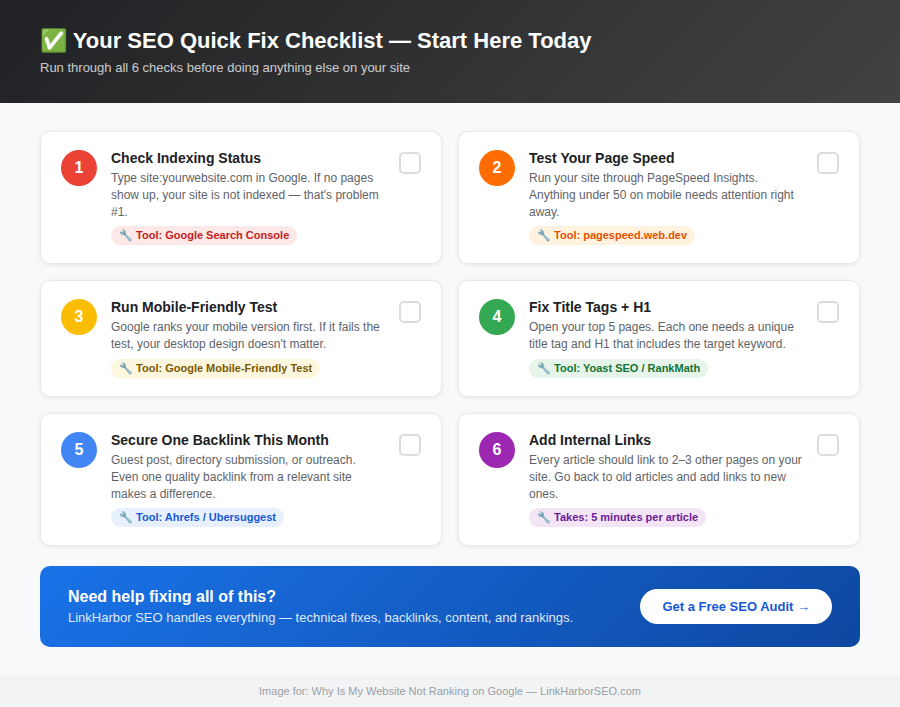
Before you spend another evening searching “why is my website not ranking on Google,” run through this:
- ☐ Check Google Search Console — are your pages actually indexed?
- ☐ Run PageSpeed Insights — are you loading in under 3 seconds on mobile?
- ☐ Run Google’s Mobile-Friendly Test — does your site pass?
- ☐ Open your top 5 pages — do they have proper title tags and H1s with your keywords?
- ☐ Have you earned at least one backlink from an outside site this month?
- ☐ Does every article on your site link to at least 2 other pages?
Said “no” to even one of these? That’s exactly where to start.
Final Thoughts
“Why is my website not ranking on Google?” is a frustrating question to be stuck on. I hear it from business owners every week — in home improvement, jewelry, construction, real estate, and beyond. But it’s fixable. Every single reason on this list has a clear solution.
Start with the basics. Check your indexing. Fix your on-page fundamentals. Speed up your site. Then work on the bigger picture — building real backlinks, creating deeper content, earning Google’s trust over time.
Ranking isn’t a one-time event. It’s something you build, consistently, month by month.
Want to move faster? The LinkHarbor SEO team has helped businesses across Pakistan, USA, UK, Canada, and Australia climb Google rankings — with real backlinks, properly optimized content, and strategies built to hold up long-term. Get in touch today and let’s find out exactly what’s holding your site back — the first audit is free.
Frequently Asked Questions
Why is my website not showing on Google?
Your website may not be showing on Google because of one or more of these reasons — it is too new, pages are not indexed, you are targeting wrong keywords, on-page SEO is weak, you have no backlinks, there are technical issues, or your content does not match search intent. Start by checking Google Search Console to identify the exact problem.
Why is my website not ranking after 3 months?
Three months is genuinely still early for most sites. New websites go through a trust-building phase with Google that takes time — we see it consistently across home improvement, real estate, construction, and other niches we work in. Keep publishing consistently, fix any technical issues you find, and focus on getting your first few quality backlinks. Most sites start seeing real movement between months 4 and 6.
Why is my website indexed but not ranking?
Getting indexed just means Google knows you exist. Actually ranking means Google thinks you deserve to be shown for a specific keyword — and that depends on your content quality, backlinks, page speed, technical SEO, and how well you match search intent. Indexing is step one. Everything else determines where you land.
How long does it take for a new website to rank on Google?
A new website typically takes 3 to 6 months to start ranking for low-competition keywords and 6 to 12 months for competitive ones. Consistent content publishing and quality backlink building speeds up this process significantly.
Can a new website rank on Google without backlinks?
For very specific, low-competition long-tail keywords — sometimes yes. But realistically, backlinks matter. Even 5 to 10 quality links from relevant sites can noticeably shift where a new domain stands in results. We’ve seen cybersecurity and construction sites stuck for months suddenly start moving after their first handful of real backlinks came in.
What is the fastest way to rank on Google?
The fastest way to rank on Google is to target low-competition long-tail keywords, fix all technical SEO issues, optimize every page properly, and build quality backlinks through guest posting on relevant websites.
How do I check if my website is indexed by Google?
Open Google and type site:yourwebsite.com in the search bar. If your pages appear, they are indexed. If nothing appears, go to Google Search Console and use the URL Inspection tool to request indexing.
Why is my website not ranking despite good content?
Good content is necessary — but it’s not sufficient on its own. We’ve worked with real estate and cybersecurity clients who had genuinely strong content stuck on page 4 because they had zero backlinks and slow page speeds. Google also looks at your overall domain authority, technical setup, and mobile performance. Content alone won’t overcome those gaps.

4 comments on “Why Is My Website Not Ranking on Google? 12 Real Reasons + Fixes (2026”